Price it. Track it. Trust the numbers.

A new era of simple, connected project management.

Right now

  • The estimate is in one spreadsheet.
  • The programme is in another app.
  • Invoice approvals run through a third.
  • Somehow that becomes a budget, a forecast, variations and a claim — across several people.

By week six, none of them agree. BidLoop is one system for the whole job, so there is only ever one set of numbers.

What changes

One set of numbers, all the way through.

Price once

Everything downstream reads it.

The programme, the cash flow, the budget and the claim all come off the estimate you already built. Nothing gets typed in twice.

Move a date

The money moves with it.

Push a task and your cash flow re-phases and the claim follows. No rebuilding a forecast every time the job changes — which is every week.

See it early

While you can still act.

Costs land against the code as invoices are approved, so an overrun shows up during the job instead of at the close-out meeting.

And it compounds

Each job prices the next.

What the work actually cost becomes a benchmark, and rates learn from real invoices. Your estimating gets better because you used it.

Proof, not promises

One job, end to end.

The same job as above, moving through the app. The figures are left in so you can check each screen against the last.

It starts with the estimate.

A real build-up on every line — the crew, the plant, the materials — each carrying its own cost code. Direct cost $129,950, contract $155,940. Hold those two figures.
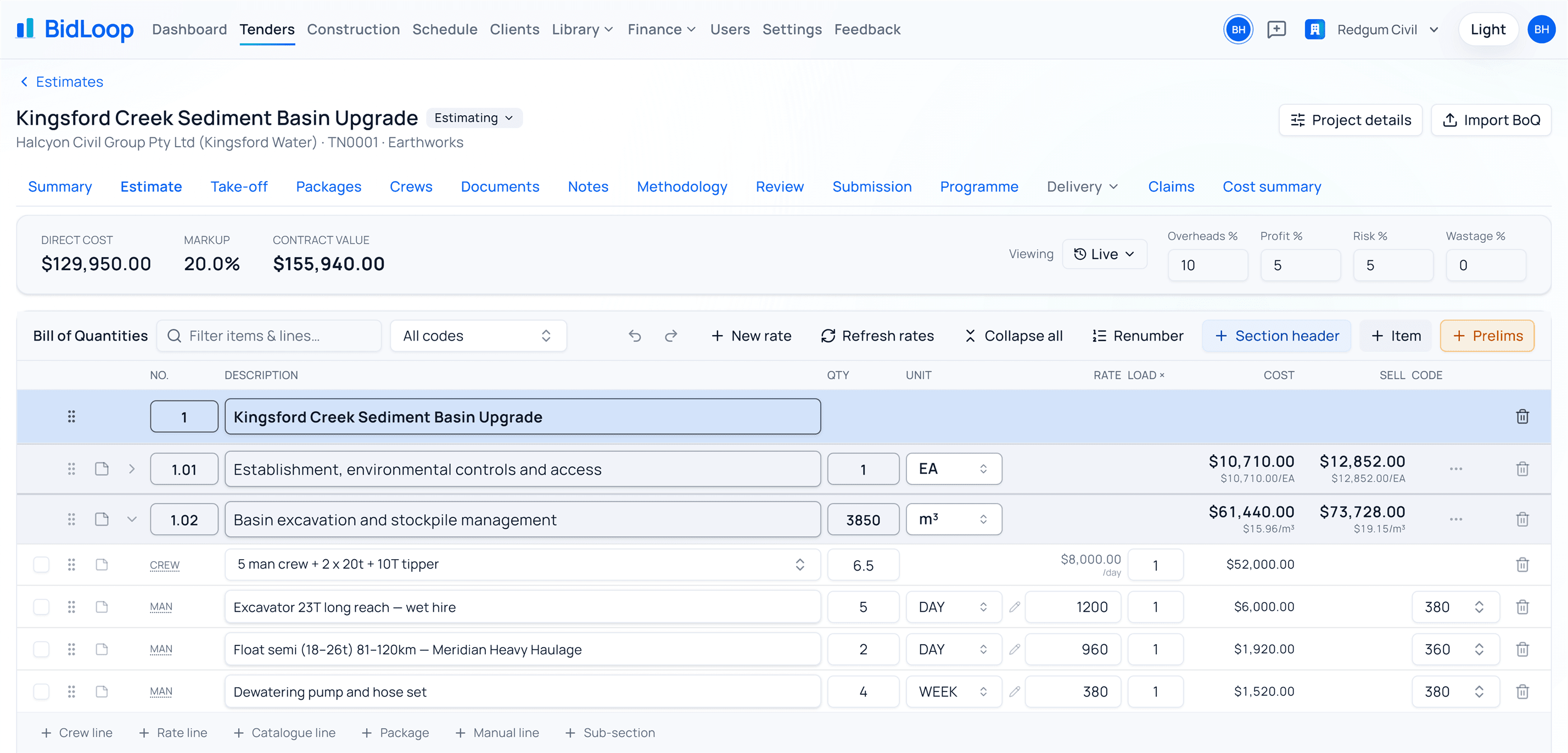
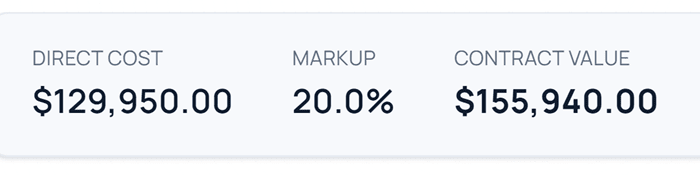
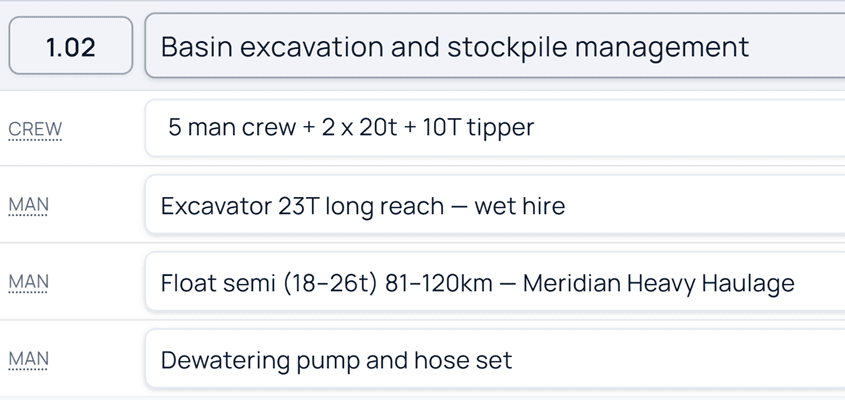
An estimate: direct cost $129,950, contract $155,940, and one bill item opened to show what is behind its rate — a five-man crew with two 20-tonne excavators and a tipper, a wet-hire long-reach excavator, a float and a dewatering pump.
Direct cost $129,950.00, markup 20.0%, contract value $155,940.00. Item 1.02, Basin excavation and stockpile management, opened to its build-up: a five-man crew with two 20-tonne excavators and a tipper, a wet-hire long-reach excavator, a float and a dewatering pump.

The programme is the estimate, scheduled.

Days go against work you have already priced. Critical path, float and working-day calendars, in and out of MS Project — and moving a date moves the cash flow and the claim with it.
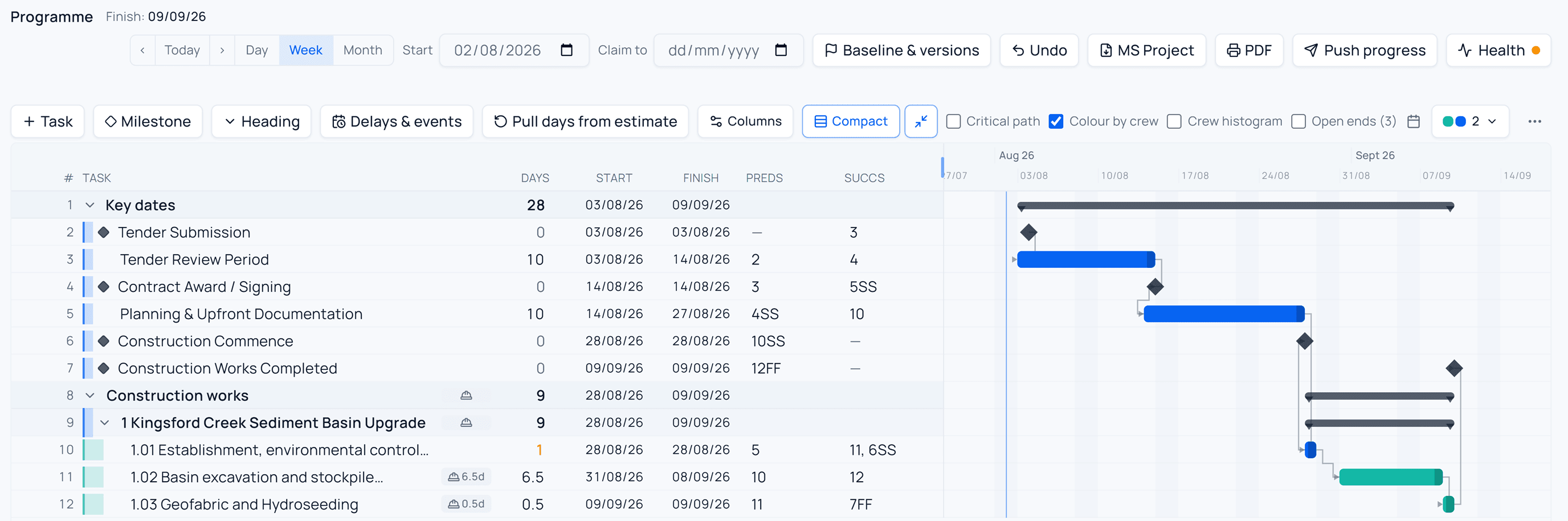
A programme showing key dates and construction works as a linked Gantt chart, with milestones, predecessors and successors, and bars coloured by crew.
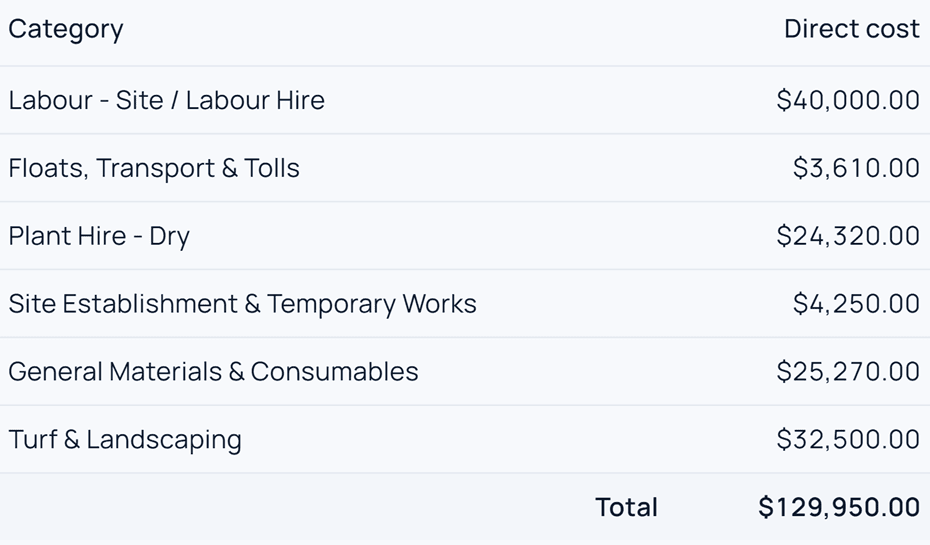
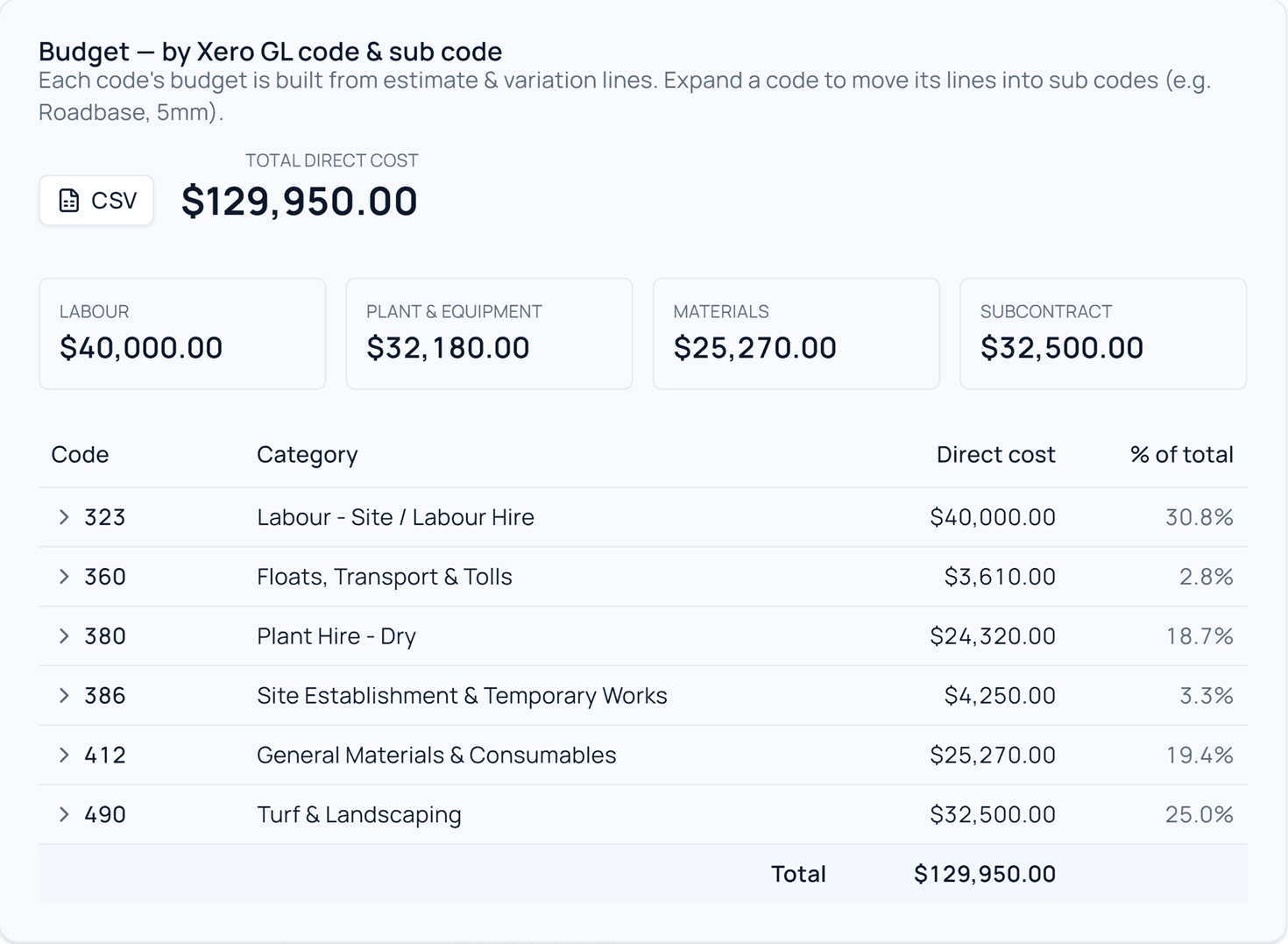
A project budget by cost code — labour, floats and transport, plant hire, site establishment, materials and landscaping — totalling $129,950.
Total direct cost $129,950.00, with a CSV export button. Budget by category: labour $40,000, floats and transport $3,610, dry plant hire $24,320, site establishment $4,250, materials $25,270, turf and landscaping $32,500 — total $129,950.

The budget is the estimate, coded.

Built from the estimate's own lines, split by cost code, and it totals $129,950 — the direct cost from the screen above. Not a number that got typed twice and happens to agree.
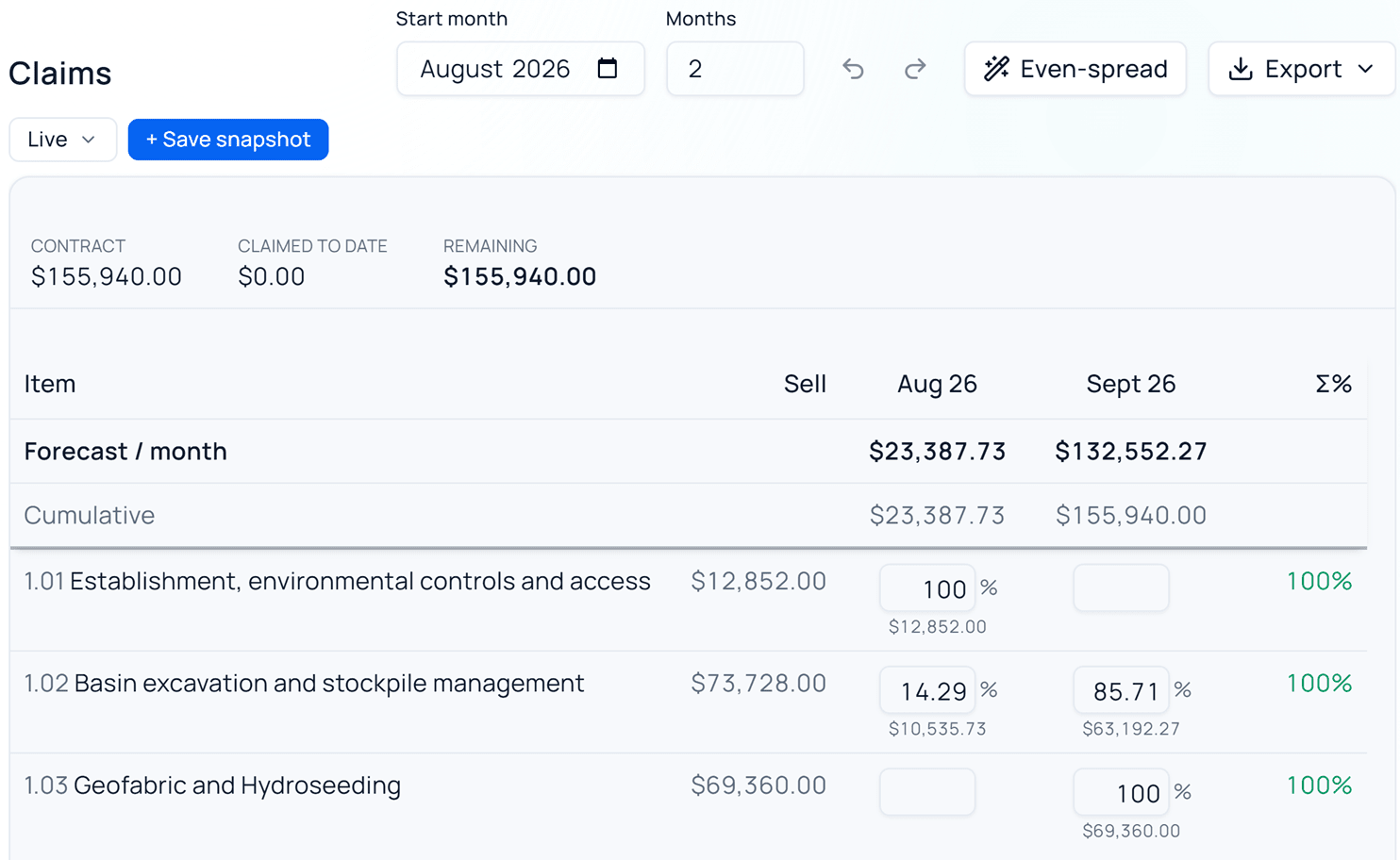

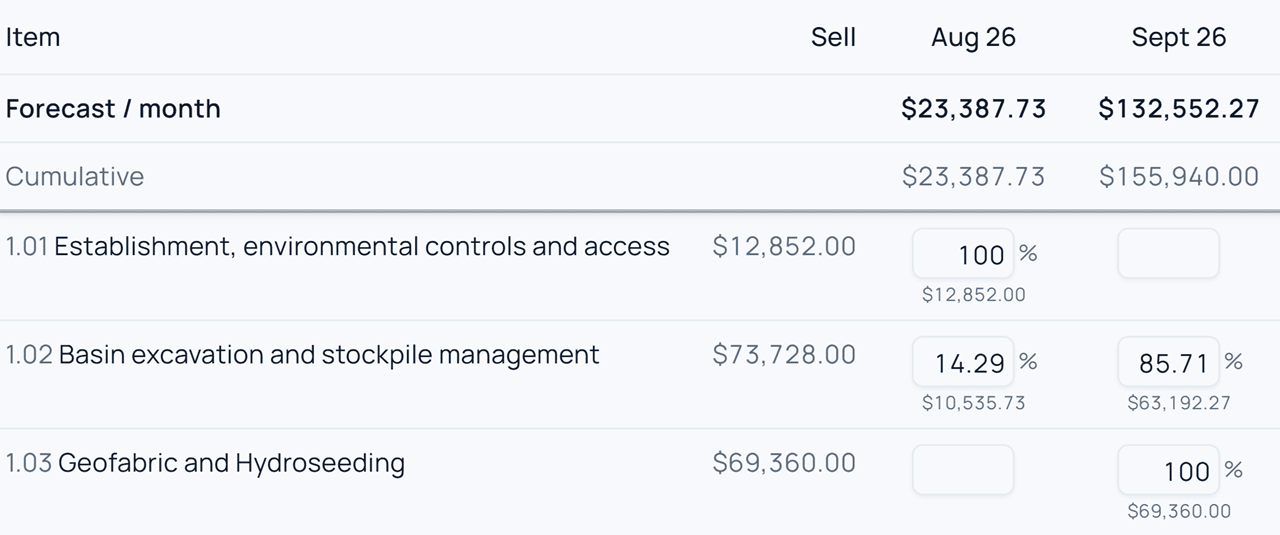
A progress claim with each bill item phased across August and September, the months summing to a $155,940 contract.
Contract $155,940.00, claimed to date $0.00, remaining $155,940.00. Each bill item phased across August and September by percentage, the two months' forecasts summing to the $155,940 contract.

The claim is the estimate, phased.

The two months come to $155,940 — the contract the estimate produced. Item 1.02 splits 14.29 and 85.71 per cent because that is how the programme runs it, not because anyone typed it.

How it works

Price a job once. It carries all the way round.

It is called BidLoop because the last step feeds the first: what a job actually cost is what prices the next one.

01

Price the tender

A real build-up on every line — crews, plant, materials, subcontract — off your own rate library.

02

Win the work

Priced bill, letter of offer, methodology and the whole submission pack out of the same job.

03

Plan it

A real programme — critical path, float, calendars — with your days against the work you priced.

04

Track the costs

Invoices read, coded and approved with real signing limits, then pushed to Xero with the PDF.

05

Claim the month

Progress claims and variations off the programme, editable after submission when things change.

06

Know where you stand

Budget, committed, actual and forecast by cost code, across every job you have running.

07 · and round again

The next tender starts from evidence

What the job actually cost becomes a benchmark, and your rates learn from real invoices — so the next estimate starts from what happened, not from what someone remembers.

Straight answers

The questions everyone asks.

Who is it for?
  • Civil contractors who tender work as a bill of quantities and get paid on progress claims — earthworks and bulk excavation, drainage, sewer and water reticulation, roadworks and subdivision, concrete and precast structures, site establishment and sediment control, rehabilitation and landscaping.
  • Inside those businesses it's built for the estimator pricing the tender, the project manager running the job, the contract administrator doing claims and variations, the bookkeeper reconciling to Xero, and the owner who wants to know what each job is really making without asking three people.
  • Where it isn't the right fit: if you quote small jobs on a single figure and invoice on completion, there's no bill of quantities for the rest of it to hang off, and BidLoop is more than you need. We'd rather tell you that up front than six weeks in.
Do we have to change how we use Xero?
  • No. Keep coding and reconciling the way you do now. BidLoop pushes approved bills across, reads back what changed, and stays out of the way. Xero stays your accounting record; BidLoop is the job side of it.
What if we use MYOB or QuickBooks?
  • Not today — BidLoop connects to Xero only. That's deliberate: one accounting connection done properly beats three done loosely, because every cost line can be traced back to the bill it came from.
We already pay for invoice scanning and approval software. Where does that fit?
  • You probably won't need it. Capture, coding and the approval chain are all here — and it knows which job the invoice belongs to, which is the part a general-purpose approvals tool can't do. Usually a subscription you stop paying for, not another one you add.
Can we get our existing jobs and history in?
  • Yes. Cost history and the invoice PDFs come straight out of Xero when you connect, so a new workspace has real numbers behind it from day one instead of starting empty.
How long before we're actually using it?
  • A tender can be priced the same day. The full setup — your rates, crews, cost codes and history — is a few days' work, and we do it with you rather than handing you a manual.
Who can see what?
  • You decide per person: five roles and a signing limit each. A site engineer sees their jobs, a manager signs to their level, the accountant runs the books. Each company's workspace is fully separate — there's no shared pool of estimates or costs.
What does it cost?
  • It depends on how many people are in it and what you turn on. We'd rather quote you honestly after the demo than publish a number that doesn't fit your business.

See it on one of your own jobs.

Twenty minutes, your numbers, no spreadsheet gymnastics.

or email hello@bidloop.com.au